Interactive Genogram Example
Explore a real three-generation family genogram. Click, zoom, and see how genograms visualize medical history, emotional relationships, and family patterns.
Live Genogram Example
Create Your OwnGenogram Example Image
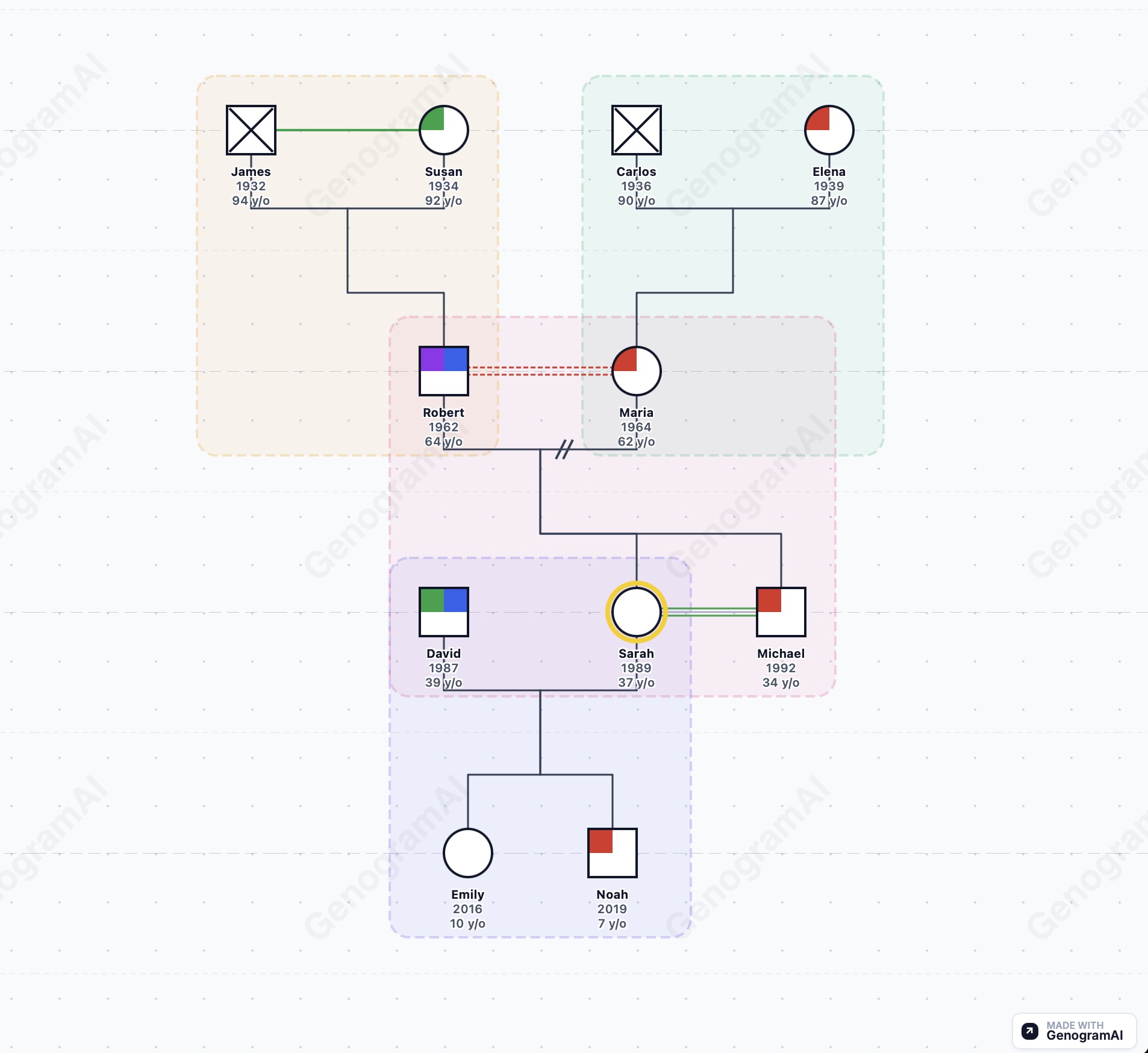
What This Genogram Example Demonstrates
Family Structure
- • Three generations: grandparents, parents, children
- • Marriage lines connecting couples
- • Children shown in birth order
- • Deceased family members marked with X
- • Index person (identified patient) highlighted
Emotional Relationships
- • Close relationships (double lines)
- • Distant relationships (dotted lines)
- • Conflictual relationships (zigzag lines)
- • Cutoff relationships (broken lines)
- • Fused/enmeshed patterns (triple lines)
Medical History
- • Heart disease (red quadrant)
- • Cancer (blue quadrant)
- • Diabetes (green quadrant)
- • Mental health conditions (yellow quadrant)
- • Cause of death when applicable
Clinical Notation
- • McGoldrick-standard symbols
- • Proper male/female shapes
- • Age indicators
- • Birth order positioning
- • Professional presentation
How to Read This Genogram Example
Basic Symbols
Squares represent males, circles represent females. A horizontal line connecting a square and circle indicates marriage or partnership. Children are shown on vertical lines descending from the marriage line, arranged left to right by birth order (oldest on the left).
Generational Layout
The genogram reads from top to bottom by generation. Grandparents appear at the top, parents in the middle, and children at the bottom. This three-generation view is the standard for most clinical assessments.
Medical Quadrants
Each person's symbol can be divided into quadrants to show medical conditions. In this example, the top-left is heart disease, top-right is cancer, bottom-left is diabetes, and bottom-right is mental health conditions. A filled quadrant indicates the condition is present.
Relationship Lines
Lines between people show emotional relationships. Solid lines indicate connection, solid blue lines show close relationships, dotted lines show distant relationships, and zigzag lines indicate conflict. Understanding these patterns helps identify family dynamics.
Frequently Asked Questions
What does this genogram example show?
This interactive genogram example displays a three-generation family with medical history indicators, emotional relationship lines, and family structure. It demonstrates how genograms visualize complex family patterns including marriages, divorces, children, and inherited health conditions.
Can I interact with this genogram example?
Yes! This is a fully interactive genogram. You can click on family members to see their details, zoom in and out to explore different parts of the family tree, and pan around the diagram. This demonstrates how GenogramAI's interactive genograms work.
How do I read the symbols in this genogram?
Squares represent males, circles represent females. A horizontal line between them indicates marriage. Children are shown below with vertical lines. An X through a symbol means deceased. Colored quadrants show medical conditions (red for heart disease, blue for diabetes, etc.). Different line styles between people show emotional relationships (close, distant, conflictual, etc.).
Can I create a genogram like this example?
Absolutely! You can create your own genogram using GenogramAI. Start for free - just describe your family in words and the AI will generate a genogram like this one. You can then customize it with medical history, emotional relationships, and more.
Is this genogram example suitable for class assignments?
Yes, this example demonstrates proper clinical genogram notation following McGoldrick standards. It's suitable for nursing, psychology, social work, and counseling courses. You can use it as a reference for understanding genogram symbols and structure.
Create Your Own Genogram
Describe your family in words. GenogramAI builds the genogram for you—just like this example, but for your family.
Start Free — No Account RequiredFree plan includes 2 genograms with all features