Genogram example · Family structure
Chosen Family Genogram
Quick answer
At a glance
| This example | |
|---|---|
| Generations | 3 |
| Family members | 11 (6 male, 5 female) |
| Birth years | 1955 to 1992 |
| Index person | Marcus Williams |
| Conditions marked | Mental Health Conditions |
| Category | Family structure |
| Tags | LGBTQ+, Family Structure, Clinical |
About this genogram
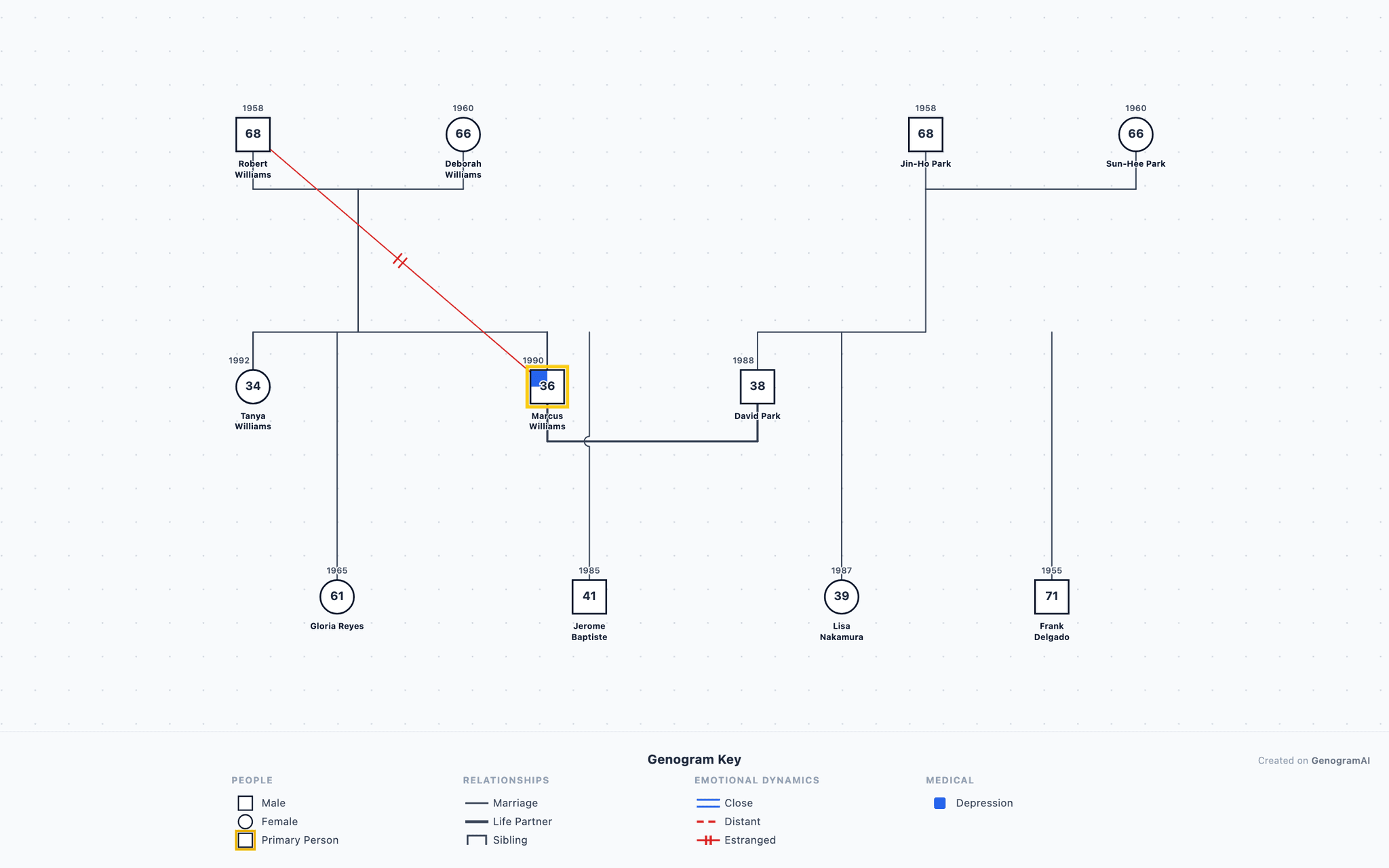
A chosen family (or 'found family') genogram depicting a queer person's support network that functions as family. This genogram illustrates both the biological family of origin — marked by rejection and estrangement — and the intentional family built through deep friendships, mentorship, and community bonds. Chosen families are especially important in LGBTQ+ communities where individuals may face rejection from biological relatives. This example shows Marcus, a 34-year-old gay man whose parents cut contact when he came out at 19, and the network of friends, mentors, and community members who became his functional family. The genogram maps both biological and chosen bonds, demonstrating how therapists can document non-traditional support systems.
Family analysis
Overview
This 3-generation genogram maps 11 family members with birth years spanning from 1955 to 1992, comprising 6 males and 5 females. The genogram tracks 1 medical/psychological condition category. The index patient is Marcus Williams (b. 1990), graphic designer.
Generation by generation
The family system encompasses 3 generations with distinct patterns at each level. The oldest generation includes Robert, Deborah, Sun-Hee and 1 other. The middle generation includes Tanya, Marcus, David, with 1 presenting documented conditions. The youngest generation includes Gloria, Jerome, Lisa and 1 other.
Health conditions
Medical and psychological conditions are documented in 1 of 11 family members (9%). Mental health conditions appears in 1 member (Marcus).
This genogram illustrates how family structure shapes individual development and relational patterns. Professionals working with families of this structure can use the genogram to normalize diverse family configurations and identify both strengths and areas for growth in the family system.
How do you read the Chosen Family Genogram?
- 1
Find each person and generation
Squares are males and circles are females, and each row is one generation, oldest at the top. This one has 6 males and 5 females across 3 generations. - 2
Check the status markers
Markers on a symbol add facts about that person: Index Patient (Arrow). The index person, the focus of the assessment, is Marcus Williams. - 3
Follow the family lines
Horizontal lines join partners and vertical lines drop to their children, born left to right in birth order. This genogram uses Marriage and Parent-Child lines. - 4
Read the shading
Shaded symbols mark health conditions: Mental Health Conditions. Trace each line of descent to see where a condition recurs and where it stops.
Genogram symbols used in this example
| Symbol | Type | What it means |
|---|---|---|
| Male (Square) | Person Symbols | A square represents a male family member in standard genogram notation. |
| Female (Circle) | Person Symbols | A circle represents a female family member in standard genogram notation. |
| Index Patient (Arrow) | Status Markers | An arrow pointing to a person identifies them as the index patient — the individual who is the focus of the clinical assessment. |
| Marriage | Structural Relationships | A solid horizontal line connecting two individuals represents a marriage or committed partnership. |
| Parent-Child | Structural Relationships | A vertical line descending from a couple line to a child symbol represents a parent-child relationship. |
| Mental Health Conditions | Medical Conditions | Shading indicates psychological or psychiatric conditions beyond anxiety and depression. |
Build a genogram like this one
Example prompt
- 1
Start from the dashboard
Sign in to GenogramAI and choose Create with AI (paid plans), or open a blank genogram and use Ask AI (any plan). To start from this exact chart instead, use Open as template. - 2
Describe your family
Paste a description like the one above, with your own names, dates, relationships and health history. - 3
Check and adjust
Edit people and lines by hand, or ask the AI for one change at a time. - 4
Export
Download a PNG on the free plan. PDF and SVG export are on paid plans.
The free plan includes 2 genograms and 5 AI credits a month. See the AI genogram creator for what else it can do.
Related resources
- Browse our genogram templates to find structures similar to this example.
- See our 3-generation genogram guide for standard multigenerational mapping techniques.
- The marriage symbol connects partnered individuals in this genogram.
Frequently asked questions
What clinical patterns does the Chosen Family Genogram reveal?
The Chosen Family Genogram maps multigenerational transmission of psychological patterns, emotional dynamics, and relationship structures. Clinicians use it to identify recurring cycles of behavior, attachment styles, and communication patterns that may inform diagnosis and treatment planning in family therapy.
Who would benefit from studying the Chosen genogram?
The Chosen genogram is valuable for family therapists, social workers, counseling students, medical professionals, and anyone interested in understanding family dynamics and intergenerational patterns through visual family mapping.
What genogram symbols are used in the Chosen Family Genogram example?
This genogram uses Male (Square), Female (Circle), Index Patient (Arrow), Marriage, Parent-Child and Mental Health Conditions. All of them follow standard genogram notation, so the chart reads the same way in any genogram program or textbook.
Can I build a genogram like the Chosen Family Genogram example?
Yes. Open GenogramAI, choose Create with AI on the dashboard (paid plans) or open a blank genogram and use Ask AI in the editor (any plan), and describe the family in plain words: who is in it, how they are related, key dates and the relationships or health conditions you want to show. The AI draws the symbols and lines, and you can then edit by hand or ask for one change at a time. A family of 11 people like this one takes a short paragraph to describe. The free plan includes 2 genograms and 5 AI credits a month, with PNG export.
About this example