Genogram example · Famous historical families
Borgia Family Genogram
Quick answer
At a glance
| This example | |
|---|---|
| Generations | 3 |
| Family members | 9 (7 male, 2 female) |
| Birth years | 1431 to 1481 |
| Deceased | 9 |
| Index person | Pope Alexander VI |
| Category | Famous historical families |
| Tags | Historical, Famous Families, Educational |
About this genogram
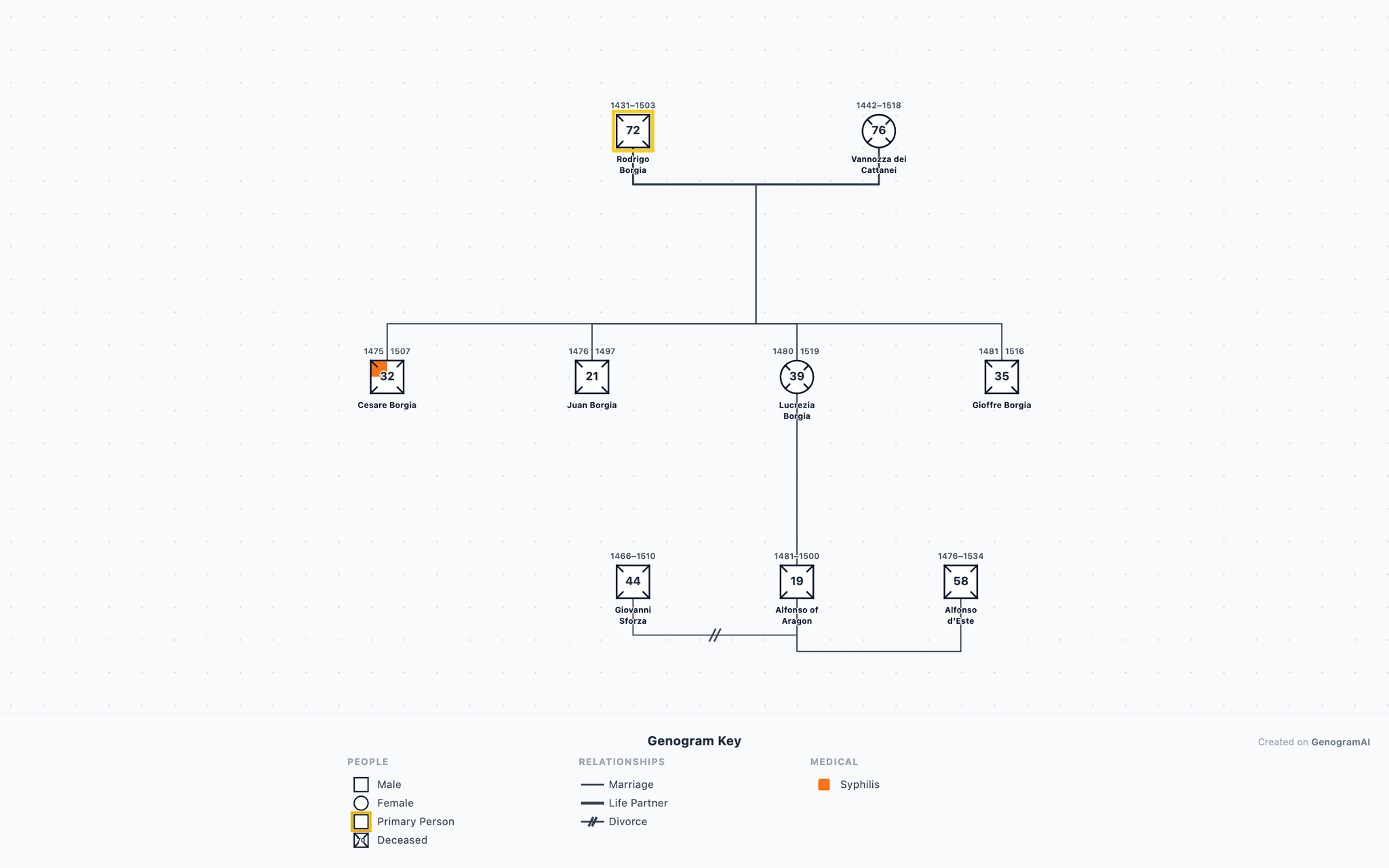
A genogram of the infamous Borgia family of Renaissance Italy, centered on Pope Alexander VI (Rodrigo Borgia) and his notorious children Cesare and Lucrezia. The Borgias epitomize the intersection of religious power, political ambition, and family dysfunction. Rodrigo fathered at least seven children while serving as a cardinal and later pope. Cesare Borgia was a cardinal turned ruthless military commander who inspired Machiavelli's 'The Prince.' Lucrezia Borgia was married three times as a political pawn, with her previous marriages annulled or ended by murder. This genogram illustrates power dynamics, political marriages, and allegations of incest and murder that have fascinated historians for over 500 years.
Family analysis
Overview
This 3-generation genogram maps 9 family members with birth years spanning from 1431 to 1481, comprising 7 males and 2 females (9 deceased). The genogram tracks 1 medical/psychological condition category. The index patient is Pope Alexander VI (b. 1431), pope (1492-1503).
The Borgia Family Genogram spans a remarkable historical period from 1431 to 1481. Notable family members include Rodrigo (pope (1492-1503)), Vannozza (roman noblewoman), Cesare (cardinal, then duke of valentinois), Juan (duke of gandia). The genogram records 9 deaths, including Rodrigo (suspected poisoning (or malaria)), Cesare (killed in battle), Juan (murdered (stabbed, thrown in tiber)).
Health conditions
Medical and psychological conditions are documented in 1 of 9 family members (11%). Substance appears in 1 member (Cesare).
Teaching use
As an educational tool, the Borgia Family Genogram provides an accessible entry point for learning genogram notation and interpretation. Because the family's history is publicly documented, students can verify relationship structures and practice reading genogram symbols against known facts. The example illustrates how even well-known families exhibit the universal dynamics of intergenerational transmission, loss, and adaptation that genograms are designed to capture.
How do you read the Borgia Family Genogram?
- 1
Find each person and generation
Squares are males and circles are females, and each row is one generation, oldest at the top. This one has 7 males and 2 females across 3 generations. - 2
Check the status markers
Markers on a symbol add facts about that person: Deceased (X) and Index Patient (Arrow). 9 people are marked deceased. The index person, the focus of the assessment, is Pope Alexander VI. - 3
Follow the family lines
Horizontal lines join partners and vertical lines drop to their children, born left to right in birth order. This genogram uses Marriage, Divorce and Parent-Child lines.
Genogram symbols used in this example
| Symbol | Type | What it means |
|---|---|---|
| Male (Square) | Person Symbols | A square represents a male family member in standard genogram notation. |
| Female (Circle) | Person Symbols | A circle represents a female family member in standard genogram notation. |
| Deceased (X) | Status Markers | An X drawn through the symbol indicates the person is deceased. |
| Index Patient (Arrow) | Status Markers | An arrow pointing to a person identifies them as the index patient — the individual who is the focus of the clinical assessment. |
| Marriage | Structural Relationships | A solid horizontal line connecting two individuals represents a marriage or committed partnership. |
| Divorce | Structural Relationships | A marriage line with two diagonal slashes indicates divorce or legal separation. |
| Parent-Child | Structural Relationships | A vertical line descending from a couple line to a child symbol represents a parent-child relationship. |
Build a genogram like this one
Example prompt
- 1
Start from the dashboard
Sign in to GenogramAI and choose Create with AI (paid plans), or open a blank genogram and use Ask AI (any plan). To start from this exact chart instead, use Open as template. - 2
Describe your family
Paste a description like the one above, with your own names, dates, relationships and health history. - 3
Check and adjust
Edit people and lines by hand, or ask the AI for one change at a time. - 4
Export
Download a PNG on the free plan. PDF and SVG export are on paid plans.
The free plan includes 2 genograms and 5 AI credits a month. See the AI genogram creator for what else it can do.
Related resources
- New to genograms? Start with our guide on how to read a genogram to understand the symbols used here.
- Reference our complete genogram symbols guide to decode the notation in this example.
- Learn what a genogram is and why family therapists use them to map multigenerational patterns.
- The deceased symbol (X through the shape) marks family members who have passed away.
- The marriage symbol connects partnered individuals in this genogram.
Frequently asked questions
What clinical patterns does the Borgia Family Genogram reveal?
The Borgia Family Genogram maps multigenerational transmission of psychological patterns, emotional dynamics, and relationship structures. Clinicians use it to identify recurring cycles of behavior, attachment styles, and communication patterns that may inform diagnosis and treatment planning in family therapy.
Why use Borgia as a genogram example?
Borgia provides an excellent genogram learning example because the family relationships are already well-known. Students and professionals can focus on understanding genogram symbols and notation rather than memorizing new family information.
What genogram symbols are used in the Borgia Family Genogram example?
This genogram uses Male (Square), Female (Circle), Deceased (X), Index Patient (Arrow), Marriage, Divorce and Parent-Child. All of them follow standard genogram notation, so the chart reads the same way in any genogram program or textbook.
Can I build a genogram like the Borgia Family Genogram example?
Yes. Open GenogramAI, choose Create with AI on the dashboard (paid plans) or open a blank genogram and use Ask AI in the editor (any plan), and describe the family in plain words: who is in it, how they are related, key dates and the relationships or health conditions you want to show. The AI draws the symbols and lines, and you can then edit by hand or ask for one change at a time. A family of 9 people like this one takes a short paragraph to describe. The free plan includes 2 genograms and 5 AI credits a month, with PNG export.
About this example