Genogram example · Academic & teaching
Medical Genogram Tutorial
Quick answer
At a glance
| This example | |
|---|---|
| Generations | 3 |
| Family members | 12 (6 male, 6 female) |
| Birth years | 1932 to 1998 |
| Deceased | 2 |
| Index person | Rachel Dixon |
| Conditions marked | Anxiety Conditions, Depressive Disorders, Mental Health Conditions, Cardiovascular Conditions, Cancer, Diabetes, Trauma/PTSD, Genetic Conditions and 4 more |
| Category | Academic & teaching |
| Tags | Academic, Medical, Educational |
About this genogram
A teaching genogram demonstrating how to document and visualize medical conditions across a family using modern medical categories with color-coding. Covers all major medical categories: heart disease, cancer, diabetes, mental health, substance use, neurological conditions, respiratory illness, autoimmune disorders, genetic conditions, reproductive issues, anxiety, bipolar disorder, depression, and PTSD. Shows how hereditary conditions cluster in families across generations for genetic risk assessment.
Pattern analysis
Overview
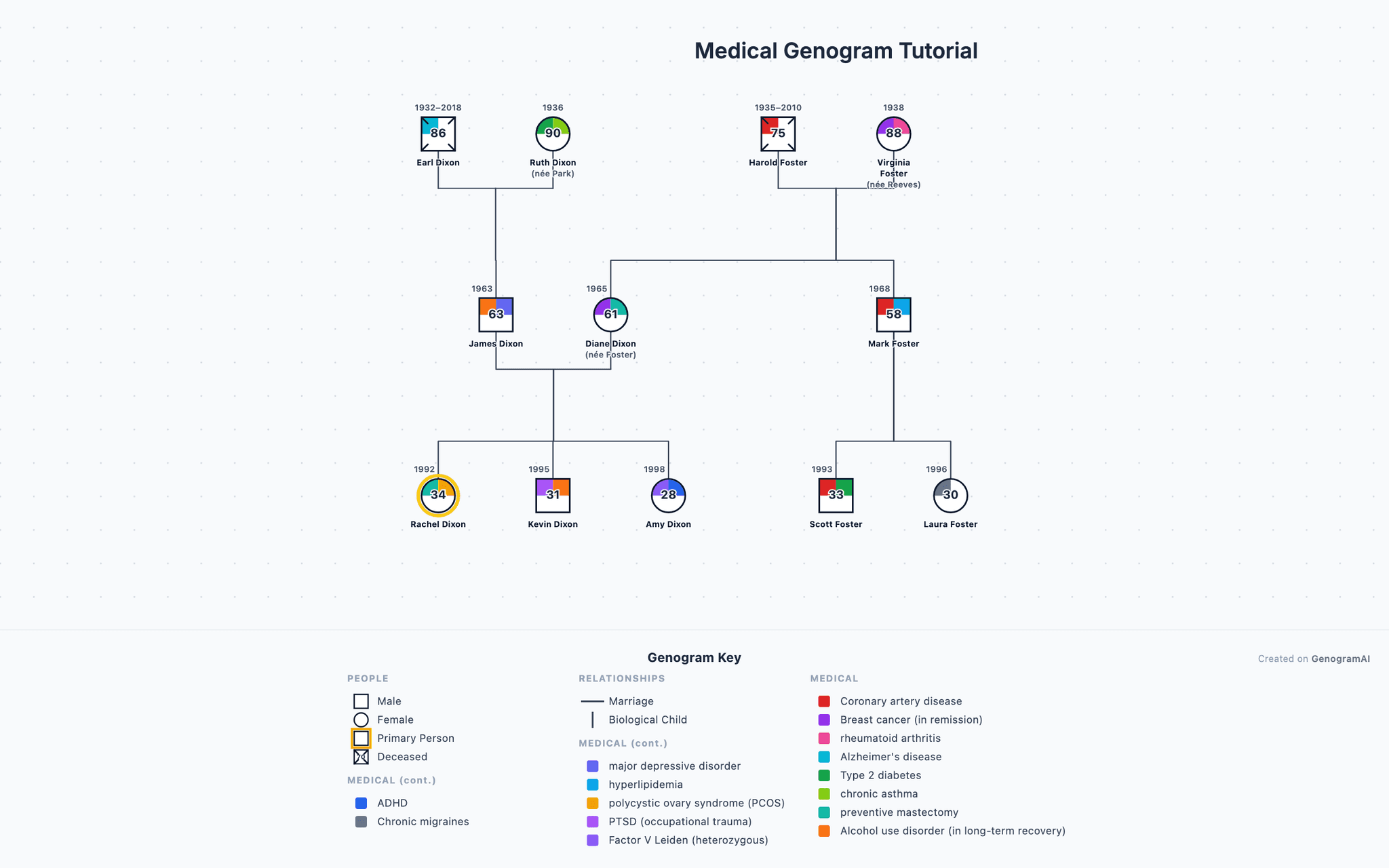
This 3-generation genogram maps 12 family members with birth years spanning from 1932 to 1998, comprising 6 males and 6 females (2 deceased). The genogram tracks 15 medical/psychological condition categories. The index patient is Rachel Dixon (b. 1992), veterinary technician.
Generation by generation
The family system encompasses 3 generations with distinct patterns at each level. The oldest generation includes Harold, Virginia, Earl and 1 other, with 4 presenting documented conditions. The middle generation includes Diane, James, Mark, with 3 presenting documented conditions. The youngest generation includes Rachel, Kevin, Amy and 2 others, with 5 presenting documented conditions.
Health conditions
Medical and psychological conditions are documented in 12 of 12 family members (100%). Cardiovascular conditions appear in 3 members (Harold, Mark, Scott). Cancer diagnoses appear in 2 members (Virginia, Diane). Diabetes appear in 2 members (Ruth, Scott), affecting 1 female and 1 male. Comorbidity is observed in 9 family members, with Virginia presenting 2 concurrent condition categories. The multigenerational prevalence of cardiovascular conditions suggests both genetic predisposition and possible environmental or behavioral transmission pathways.
Teaching use
As a teaching resource, this genogram demonstrates standard McGoldrick–Gerson notation in a realistic family context. Students can practice identifying key patterns: multigenerational transmission, family life cycle stages, and the interplay between structural relationships and emotional processes. This example serves as a foundation for understanding how genograms organize complex family information into a clinically useful visual format.
How do you read the Medical Genogram Tutorial?
- 1
Find each person and generation
Squares are males and circles are females, and each row is one generation, oldest at the top. This one has 6 males and 6 females across 3 generations. - 2
Check the status markers
Markers on a symbol add facts about that person: Deceased (X) and Index Patient (Arrow). 2 people are marked deceased. The index person, the focus of the assessment, is Rachel Dixon. - 3
Follow the family lines
Horizontal lines join partners and vertical lines drop to their children, born left to right in birth order. This genogram uses Marriage and Parent-Child lines. - 4
Read the shading
Shaded symbols mark health conditions: Anxiety Conditions, Depressive Disorders, Mental Health Conditions, Cardiovascular Conditions, Cancer, Diabetes, Trauma/PTSD, Genetic Conditions and 4 more. Trace each line of descent to see where a condition recurs and where it stops.
Genogram symbols used in this example
| Symbol | Type | What it means |
|---|---|---|
| Male (Square) | Person Symbols | A square represents a male family member in standard genogram notation. |
| Female (Circle) | Person Symbols | A circle represents a female family member in standard genogram notation. |
| Deceased (X) | Status Markers | An X drawn through the symbol indicates the person is deceased. |
| Index Patient (Arrow) | Status Markers | An arrow pointing to a person identifies them as the index patient — the individual who is the focus of the clinical assessment. |
| Marriage | Structural Relationships | A solid horizontal line connecting two individuals represents a marriage or committed partnership. |
| Parent-Child | Structural Relationships | A vertical line descending from a couple line to a child symbol represents a parent-child relationship. |
| Anxiety Conditions | Medical Conditions | Shading in the genogram symbol indicates anxiety-spectrum diagnoses (GAD, panic disorder, phobias, OCD). |
| Depressive Disorders | Medical Conditions | Shading indicates depressive conditions (major depression, dysthymia, bipolar disorder). |
| Mental Health Conditions | Medical Conditions | Shading indicates psychological or psychiatric conditions beyond anxiety and depression. |
| Cardiovascular Conditions | Medical Conditions | Shading indicates heart disease, hypertension, stroke, or other cardiovascular conditions. |
| Cancer | Medical Conditions | Shading indicates any cancer diagnosis, with specifics noted in the individual's record. |
| Diabetes | Medical Conditions | Shading indicates Type 1 or Type 2 diabetes. |
| Trauma/PTSD | Medical Conditions | Shading indicates post-traumatic stress disorder or complex trauma responses. |
| Genetic Conditions | Medical Conditions | Shading indicates inherited genetic disorders (sickle cell, hemophilia, cystic fibrosis, etc.). |
| Neurological Conditions | Medical Conditions | Shading indicates neurological disorders (Alzheimer's, Parkinson's, epilepsy, etc.). |
| Respiratory Conditions | Medical Conditions | Shading indicates chronic respiratory conditions (asthma, COPD, etc.). |
| Autoimmune Conditions | Medical Conditions | Shading indicates autoimmune disorders (lupus, rheumatoid arthritis, MS, etc.). |
| Other Medical | Medical Conditions | Shading indicates medical conditions not captured by other categories. |
Build a genogram like this one
Example prompt
- 1
Start from the dashboard
Sign in to GenogramAI and choose Create with AI (paid plans), or open a blank genogram and use Ask AI (any plan). To start from this exact chart instead, use Open as template. - 2
Describe your family
Paste a description like the one above, with your own names, dates, relationships and health history. - 3
Check and adjust
Edit people and lines by hand, or ask the AI for one change at a time. - 4
Export
Download a PNG on the free plan. PDF and SVG export are on paid plans.
The free plan includes 2 genograms and 5 AI credits a month. See the AI genogram creator for what else it can do.
Related resources
- Use this example as a reference for genogram assignments in family therapy courses.
- Our guide for genograms for psychology students explains the notation used in this example.
- Start with simple genogram examples if you are new to genogram notation.
- The deceased symbol (X through the shape) marks family members who have passed away.
- The marriage symbol connects partnered individuals in this genogram.
Frequently asked questions
What clinical patterns does the Medical Genogram Tutorial genogram reveal?
The Medical Genogram Tutorial genogram maps multigenerational transmission of psychological patterns, emotional dynamics, and relationship structures. Clinicians use it to identify recurring cycles of behavior, attachment styles, and communication patterns that may inform diagnosis and treatment planning in family therapy.
How can students use the Medical Genogram Tutorial genogram?
Students can use the Medical Genogram Tutorial genogram as a reference for learning genogram symbols, notation, and interpretation. It serves as a teaching template for family therapy courses, social work programs, and psychology classes.
What genogram symbols are used in the Medical Genogram Tutorial example?
This genogram uses Male (Square), Female (Circle), Deceased (X), Index Patient (Arrow), Marriage, Parent-Child, Anxiety Conditions, Depressive Disorders, Mental Health Conditions, Cardiovascular Conditions, Cancer, Diabetes and 6 more. All of them follow standard genogram notation, so the chart reads the same way in any genogram program or textbook.
Can I build a genogram like the Medical Genogram Tutorial example?
Yes. Open GenogramAI, choose Create with AI on the dashboard (paid plans) or open a blank genogram and use Ask AI in the editor (any plan), and describe the family in plain words: who is in it, how they are related, key dates and the relationships or health conditions you want to show. The AI draws the symbols and lines, and you can then edit by hand or ask for one change at a time. A family of 12 people like this one takes a short paragraph to describe. The free plan includes 2 genograms and 5 AI credits a month, with PNG export.
About this example