General AI diagrams vs clinical genograms
ChatDiagram makes general diagrams. You need clinical genograms.
Quick answer
GenogramAI vs ChatDiagram: feature comparison
| Feature | GenogramAI | ChatDiagram |
|---|---|---|
| Genogram-specific design | Yes, built only for genograms and eco-maps | No, general diagrams |
| Standard genogram symbols | Yes: McGoldrick-style notation | No |
| Medical conditions | Yes: 22 categories, classic or quadrant shading | No |
| Emotional relationship lines | Yes: 39 emotional line types | No |
| Cultural heritage patterns | Yes: 9 fill patterns | No |
| AI image upload (photo of a drawn genogram) | Yes, on Pro | No |
| Editable relationships | Click a line to change its type | No |
| AI text-to-diagram | Yes (5 AI credits a month free, unlimited on Pro) | Yes |
| Multiple diagram types | No (genograms, eco-maps, freeform) | Yes: flowcharts, sequence, ER diagrams |
| Cloud storage | Yes | Yes |
| Export | PNG free; PDF, SVG, GEDCOM on Pro | PNG/SVG |
| Price to start | Free (2 genograms); Pro $12/mo | Free and paid tiers |
AI that understands genograms
| ChatDiagram AI | GenogramAI | |
|---|---|---|
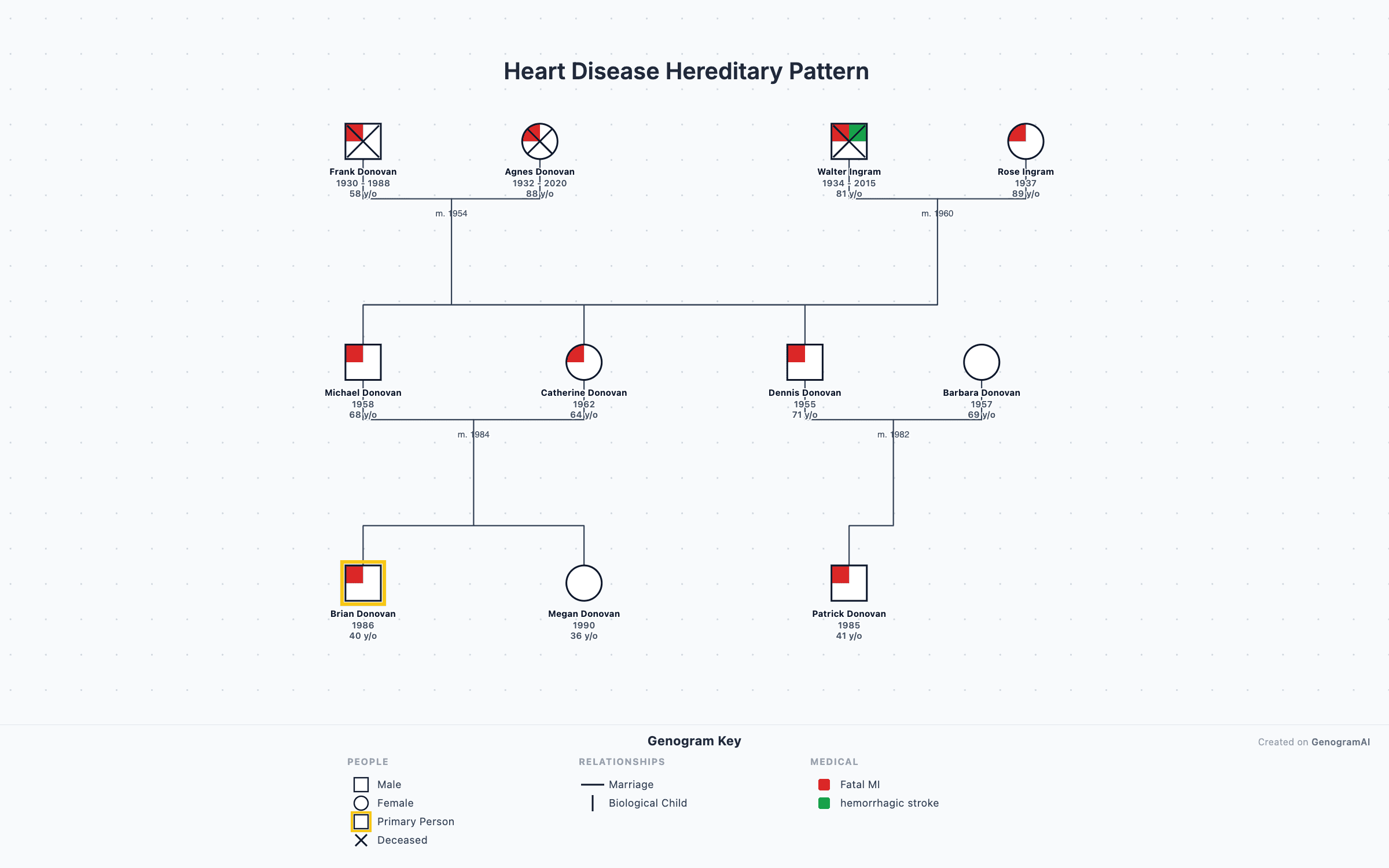
| Input | “Create a family tree with grandparents, two children, one divorced” | “Three generations. Grandparents married 50 years. Son divorced with two kids. History of heart disease on father’s side.” |
| Output | Generic boxes and lines. No gender symbols, relationship types or medical data. A simple hierarchy diagram. | A genogram with McGoldrick-style symbols, marriage and divorce notation, heart disease shaded on the father’s side, and a correct generational layout. |
Why ChatDiagram falls short for genograms
No medical quadrants
No emotional overlays
No standard genogram notation
Limited relationship types
When to choose each tool
Choose ChatDiagram when…
- You need quick flowcharts or sequence diagrams
- You want to generate ER diagrams from text
- You need simple diagrams for documentation
- You want a basic (non-clinical) family tree
Choose GenogramAI when…
- You need clinically accurate genograms with proper notation
- You need to map emotional relationship dynamics
- You need medical history tracking across generations
- You’re a therapist, social worker, or counselor
- You want AI that places correct genogram symbols
Pros and cons
| GenogramAI | ChatDiagram | |
|---|---|---|
| Pros | Purpose-built for clinical genograms; McGoldrick-style notation; AI tuned for genogram notation; 39 emotional relationship types; medical shading and cultural patterns | AI text-to-diagram generation; many diagram types; simple, clean interface |
| Cons | Only genograms, eco-maps and freeform diagrams; no flowchart or sequence diagram features | Not genogram-specific; no McGoldrick notation; no emotional relationship overlays; no medical features; basic connections only |
GenogramAI vs ChatDiagram: FAQs
Can ChatDiagram create genograms?
ChatDiagram can generate basic family tree-style diagrams from text descriptions, but it cannot create proper clinical genograms. It lacks McGoldrick-style notation, emotional relationship lines, medical quadrants, and the standardized genogram symbols that professionals require.
What is the best ChatDiagram alternative for genograms?
GenogramAI is built for this. While both tools use AI, GenogramAI is purpose-built for clinical genograms with 64 relationship types (18 partner, 39 emotional, 7 child connection types), medical shading, AI text-to-genogram generation with proper notation, and PNG, PDF, SVG and GEDCOM export.
Does ChatDiagram support emotional relationship mapping?
No. ChatDiagram generates general diagrams and does not support emotional relationship overlays such as close, distant, conflictual, fused, or cutoff relationships. GenogramAI supports 39 emotional relationship line types used in clinical practice.
Is GenogramAI’s AI better than ChatDiagram for family diagrams?
For clinical genograms, yes. GenogramAI’s AI understands genogram-specific notation and places correct symbols, relationship lines, and medical indicators. ChatDiagram’s AI is designed for general diagrams like flowcharts and sequence diagrams, not clinical family systems.
How much does GenogramAI cost compared to ChatDiagram?
GenogramAI’s free plan includes 2 genograms, every symbol and relationship type, 5 AI credits a month and PNG export. Pro ($12/mo or $99/yr) raises that to 25 genograms with unlimited AI, and Clinical ($29/mo or $228/yr) has no genogram limit. ChatDiagram also has free and paid tiers, but as a general diagramming tool it has no genogram-specific features.
Need AI that understands genograms?
Describe your family and get a proper genogram in seconds. Start free, or see all features. Try GenogramAI free