Can't Find the Toolbar or a Button?
A map of the editor: where the File menu, toolbar, AI Assistant, Share, key, and zoom controls are, and how to get them back.
"Where is the toolbar?" and "I don't see the export button" are two of our most common questions. Here's where everything lives in the editor.
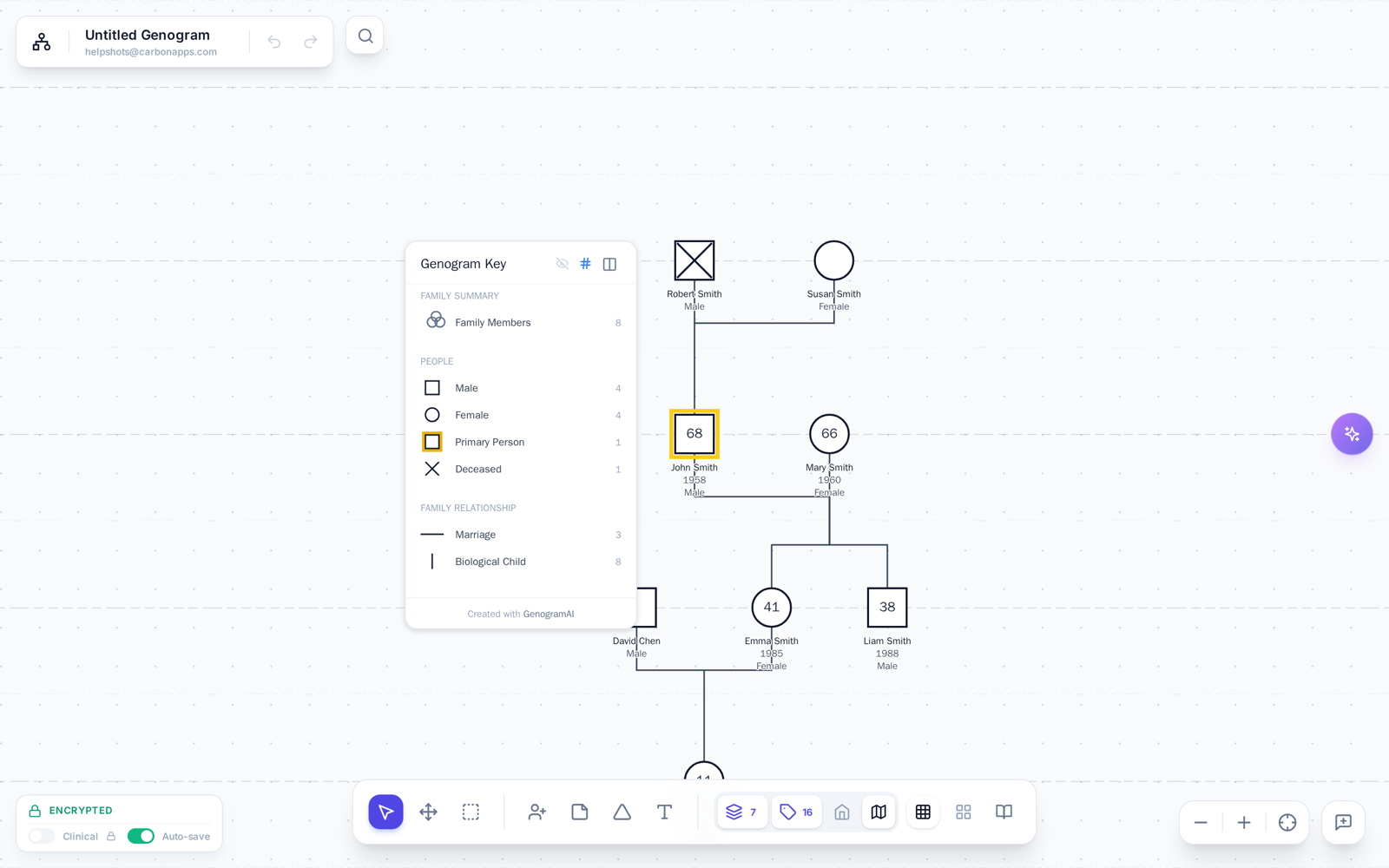
The map
- Top left: the File menu. Click the GenogramAI logo next to the genogram's name. This is where Back to Files, New, Duplicate, the save status with Save now, Export (Image…, PDF…, Print…, GEDCOM, Report, Download local copy), Chronology, Present and Share are, with icons for Settings and Canvas settings at the bottom. Undo, redo and search sit next to it.
- Top right: Send feedback, Share and Ask AI. Two icon-only buttons, the speech bubble Send feedback (with Help Center and Send us a message) and the share icon Share, which publishes a view-only link, then Ask AI (Cmd/Ctrl + K), which opens the AI Assistant.
- Bottom centre: the toolbar, in groups labelled Edit (Select, Pan, Bulk Select), Add (Add Person, Add Note, Add Secret, Add Text, Household lasso, Background region), View (Views, Text Labels, Show Key, Snap to Grid, the clock View as of a year, Auto Arrange) and Guide (Research view, which needs the Clinical plan to turn on, and Library). With something selected, Duplicate and a red Delete appear at the right end.
- Bottom left: the save status, the Clinical switch and the Auto-save switch.
- Bottom right: Zoom Out, Zoom In and Fit genogram to screen.
A toolbar button is missing
When the window is narrow, or the AI panel or Inspector takes up room, the toolbar condenses: it keeps only Select, Pan, Add Person, Views, Text Labels and the tool you're using, plus an up-chevron More tools at its right end. Click More tools and the same bar expands in place with every tool (the key, Snap to Grid, the clock, Auto Arrange, Library, Add Note, Add Secret, Add Text and the lasso). Fewer tools, Esc, a click outside or picking a tool folds it again.
Looking for Households? It is no longer its own toolbar button: open Views and tick Households. Hidden groups come back with Show … hidden groups in the same menu.
The toolbar seems to be gone
- Tall window: when the window is taller than it is wide and tall enough (about 1,030 px), the toolbar moves to the left edge and stands vertically. Widen the window to bring it back to the bottom.
- Browser zoom: if your browser is zoomed in, controls can fall off the screen. Press Cmd + 0 / Ctrl + 0 to reset to 100%.
- Dashboard vs. editor: the toolbar only exists inside the editor. Open a genogram first.
- Time view: while you are viewing the chart as of a past year, the toolbar is replaced by the year slider. Click the X (Close time view), Back to today or press Esc to get the toolbar back.
- Phones: small screens use a floating pill at the bottom with icon buttons: Select, Pan, fit-to-screen, Undo, Redo, Add Person and ⋯. ⋯ opens a sheet with three tabs: Tools (note, secret, text, arrange), View Layers (View as of a year, Present, the view tiles, Medical shading, Text Labels, Text size) and More (Auto Arrange, Snap to Grid, Show Key, Symbol Library, Publish & Share, Feedback). Zoom is at the top right.
- Freeform documents: Views, Text Labels, Snap to Grid, Auto Arrange, Time view and Library are hidden on purpose, because you ask the AI for those. Only the key toggle stays.
Common "where is..." answers
- Export, PDF, print: File menu (logo, top left). See Printing & Saving as PDF.
- The key (legend): the Show Key button (map icon) in the View group of the toolbar, or under More tools when the toolbar is condensed.
- The Inspector: click a person or a line and it opens on the right.
- More actions for a person or line: right-click it (long-press on touch) for Add parent, Add Partner, Add Child, Change type, Delete and more.
- Lost the genogram off screen: Fit genogram to screen at the bottom right.
- The AI Assistant: Ask AI at the top right. See The AI Assistant.
- Background dots and generation lines: File menu > Canvas settings.
Still stuck? Click the speech-bubble Send feedback button at the top right of the editor and choose Send us a message (or Help Center), and tell us your screen size and browser.