Ecomaps
How to build an ecomap during a 20-minute intake
Quick answer
Why is 20 minutes the right budget?
Most intake sessions have a hard time constraint. Some agencies allot 45 minutes, some 60, some less. After greetings, paperwork, consent, and the presenting concern, you typically have 15 to 25 minutes of usable assessment time. The ecomap has to fit inside that — alongside the genogram, the BPS narrative, and whatever else the protocol calls for.
The good news: the ecomap doesn’t need to be beautiful to be useful. It needs to be complete enough to drive the next conversation. The workflow below hits that bar in twenty minutes consistently.
The common mistake is treating the ecomap as documentation rather than as a conversation tool. If you draw it while facing your screen and the client faces the wall, you will finish faster and learn less. The ecomap pays off most when the client can see the canvas as it builds. Their corrections — “that line should be stressful, not strong” — are exactly the clinical data you came for. Position the screen so both of you can see it.
Twenty minutes also happens to align well with how long it takes for most clients to move past surface-level answers. The first five minutes of ecomap work produces expected data: household, immediate family, maybe one or two services. It is around minute ten or twelve, when the client starts looking at the partial canvas and filling in gaps unprompted, that the more significant disclosures tend to arrive. Budget for that.
The 20-minute structure
| Minute | Focus | What to do |
|---|---|---|
| Minute 0–2 | Set the center | Open the canvas with the client looking on. Drop the center bubble. Write their name (or "Client" in Clinical Mode). Note pronouns, age, and the presenting concern as a one-line subtitle. |
| Minute 2–6 | Family | Add household first, then immediate family. Don't worry about line styles yet — get the names down. Lines default to neutral. |
| Minute 6–10 | Services + supports | Therapist, primary-care MD, social worker, support group, faith community, school/work. Use the categorized system types so the canvas color-codes for you. |
| Minute 10–14 | Stressors | Now switch on line styles. Walk through each system you have: ask the client to label it strong, weak, stressful, or conflicted. This is the conversation — let it run. |
| Minute 14–17 | Energy direction | Quick pass: which arrows point in (receiving support), which point out (giving), which are mutual. Most clients categorize quickly once they see the pattern. |
| Minute 17–19 | Missing systems | Ask: "Anyone I missed? Anything that takes up a lot of your time or energy that isn't up here yet?" Often this surfaces something important — using friends, an estranged sibling, a chronic-pain provider. |
| Minute 19–20 | Save + share | Save the ecomap to the case. Export a PNG for the case file (PDF export is on the Professional and Clinical plans), or share a link if the client wants a copy. Close with one observation about what stood out. |
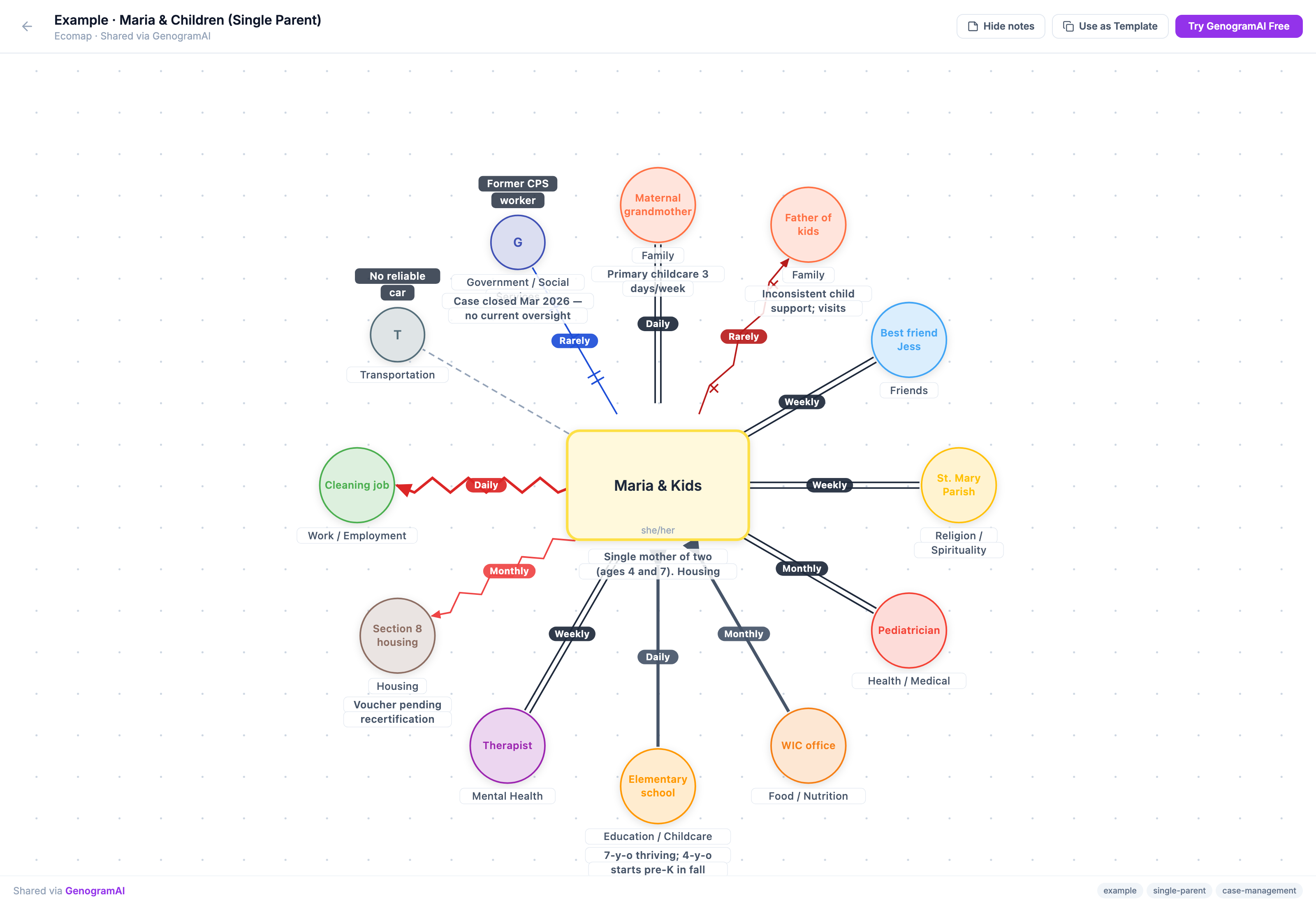
Three habits that save time
- Don’t pick categories before line styles. Most clinicians do them in the wrong order — they choose “Mental health” before they know whether the relationship is strong or stressful. Get the names down, then the lines, then the categories.
- Use the AI generator when the client brings a case summary. If you have a referral packet or prior chart note that lists systems, paste it into the AI generator first. Spend the intake refining instead of creating from blank.
- Save before you analyze. The ecomap is most valuable as a snapshot in time. Save it before you start interpreting — that’s the version you’ll diff against in 90 days.
What to do if you’re running over
Skip the energy-direction pass. Arrowheads are useful but the connection itself is the load-bearing data. You can add direction at the next session, after the client has had a chance to think about which exchanges actually feel reciprocal and which are one-sided.
If you’re really crunched, just get the systems and the line styles down. That’s a usable intake-version ecomap. The polish — consistent category coloring, perfect labels, complete annotations — can happen at your desk after the client leaves.
What an intake ecomap should and should not be
An intake ecomap is a snapshot, not a finished product. It captures the client’s support environment at one specific moment. The clinical value comes from three things: the gaps it makes visible (categories that are absent), the stressors it names (relationships that drain rather than support), and the change story it sets up for future sessions (the comparison between this ecomap and the next one).
An intake ecomap should not be treated as the permanent record of the client’s world. Lives change. A strong recovery sponsor at week one may have relapsed by week twelve. A stressful family relationship may have healed. A service connection that was broken may be restored. The intake version is the baseline. Its value multiplies when you re-draw at 30, 60, and 90 days and compare. The story those three versions tell together — what got stronger, what dissolved, what appeared that was not there before — is more useful than any single canvas on its own.
The 21st-minute habit
After the client leaves, take one minute to ask: what surprised me here?Often it’s a connection the client minimized that the diagram makes look bigger than expected. Or a system that’s missing where you’d expect to see one. Note these in the case file. That observation is the actual clinical product of the intake ecomap — the diagram is just the artifact that surfaced it.
Related: Step-by-step ecomap guide, ecomap in social work, AI ecomap generator.
Try it
Frequently asked questions
How long does it take to make an ecomap?
A usable intake ecomap fits in about 20 minutes: two minutes for the center, about eight for family, services and supports, about seven for line styles and energy direction, and the last few for missing systems and saving. If you are short on time, get the systems and line styles down and add arrows at the next session.
What order should I build an intake ecomap in?
Names first, then line styles, then categories. Choosing a category before you know whether a relationship is strong or stressful slows the conversation down.
Should the client see the ecomap while I draw it?
Yes. The ecomap pays off most when the client can see the canvas as it builds. Their corrections, such as "that line should be stressful, not strong", are the clinical data you came for.
How often should I redraw an intake ecomap?
Treat the intake version as a baseline and redraw at 30, 60 and 90 days. Comparing the versions shows what got stronger, what dissolved and what appeared.