Detailed family tree maker
An advanced family tree, with every detail that matters
Quick answer
What makes a family tree detailed?
A basic family tree answers one question: who is related to whom. It is a chart of descent, and every line means either “married to” or “child of.” That is enough for a lot of purposes, and it breaks down quickly when a family has a second marriage, an adoption, a pattern of heart disease, or two siblings who have not spoken in twenty years.
An advanced family tree keeps the same layout and adds information in standardized layers. The notation comes from clinical practice, where it has been used for decades to record family structure and relationships. You don't need to know it: pick “divorced” or “close” and the editor draws the right line. The full comparison is in genogram vs family tree.
The same kind of family, at two levels of detail
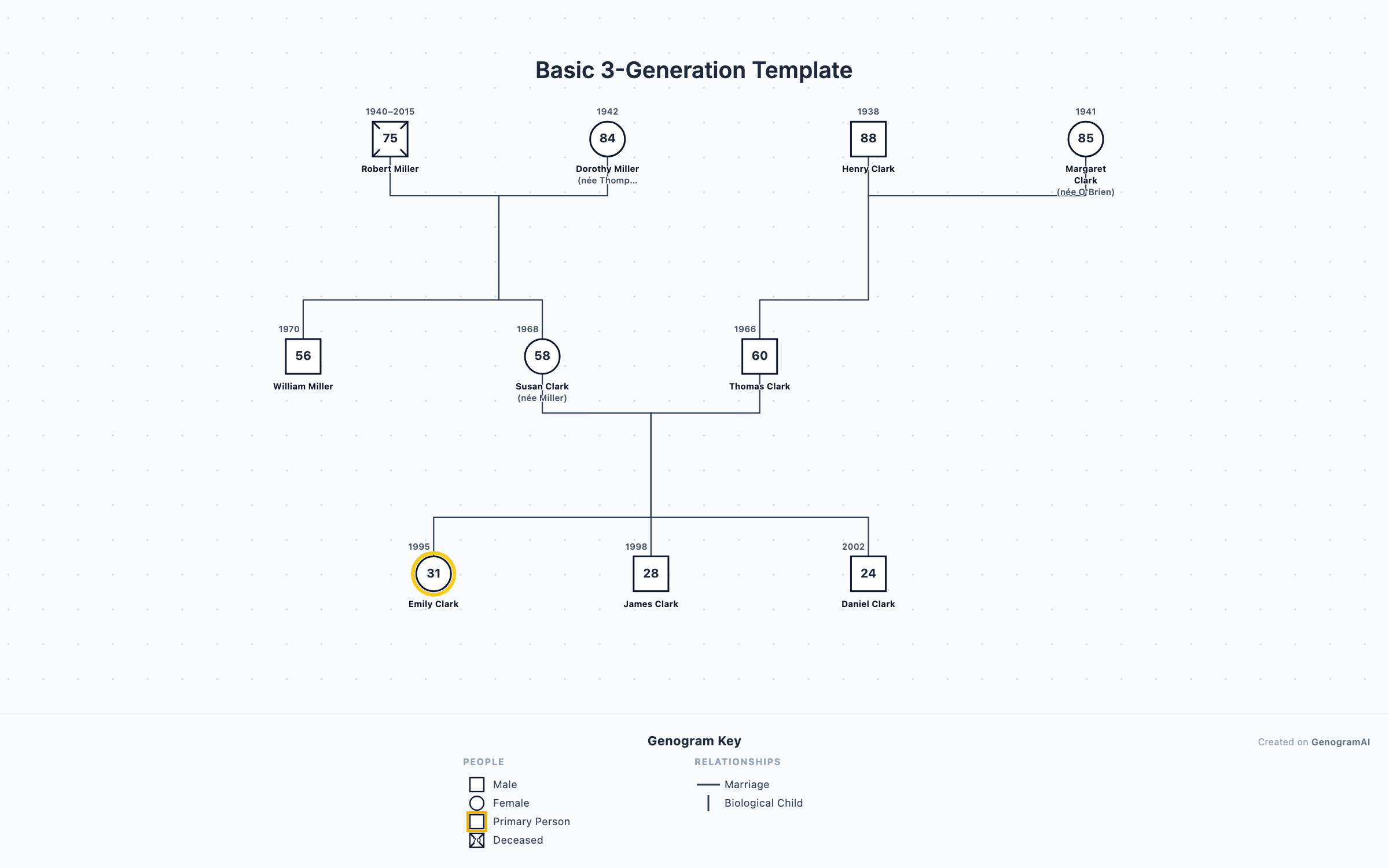
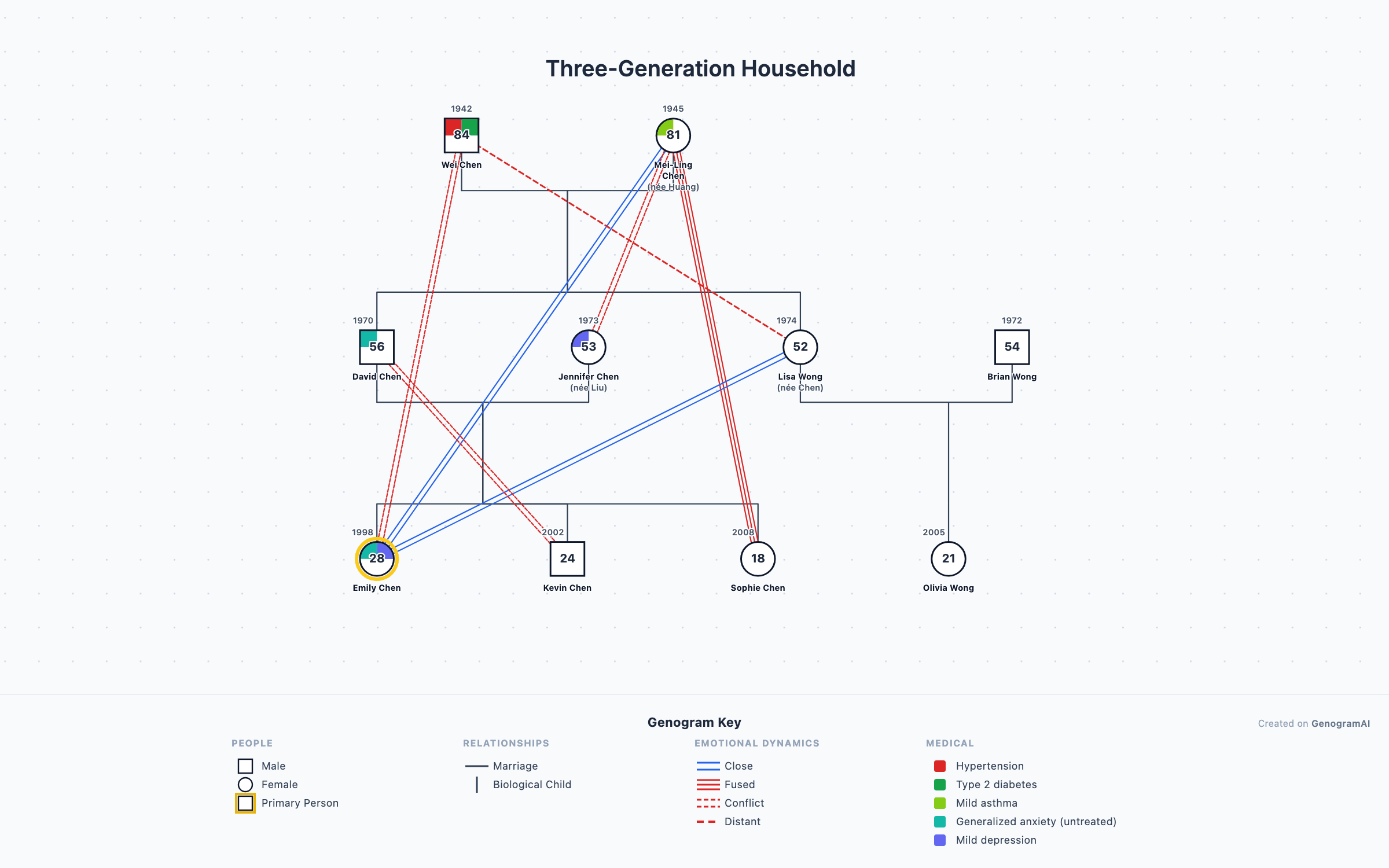
In the second chart you can see at a glance that the grandfather has hypertension and type 2 diabetes, that anxiety appears in both his son and his eldest granddaughter, that she is close to her grandmother and her aunt, and that she and her grandfather are in conflict. None of that fits on a plain tree, and all of it matters to the family.
Every layer you can add
Partnerships with dates
Health history
Emotional relationships
How children joined the family
Households
Heritage and place
Time
Notes and labels
All of it is optional
How much detail do you need?
| Purpose | Essential details | Worth adding |
|---|---|---|
| Genealogy or family history | Dates, places, maiden names, multiple marriages | Location and heritage views, Time view |
| Medical or genetic history | Health conditions, ages at diagnosis, causes of death | Medical quadrants with a key |
| Blended or adoptive family | Divorce and remarriage, step, adopted and foster links | Households, closeness lines |
| School project | Three generations, names, birth years | Birthplaces and a fact per person |
| Therapy or a class assignment | Three generations, emotional relationships, patterns | Medical, households, notes |
| Fiction and worldbuilding | Marriages, heirs, deaths | Affairs, feuds, secret parentage |
Guides for each: genealogy, medical family history, blended families, adoption, school projects, class assignments and fiction.
How to build a detailed family tree
- 1
Start with the structure
Add three generations of people, marriages and children, or start from a template. This is your plain family tree. - 2
Add dates and life events
Birth and death years, marriage and divorce years. Ages appear inside each symbol automatically. - 3
Add health history
Add conditions to each person; they appear as colored quadrants with a key. - 4
Add relationships where they matter
Close, distant, conflict, cutoff and more, only where they explain the family. - 5
Switch views and export
Turn layers on and off for different readers, then export a PNG (free) or PDF and SVG (paid).
Faster: describe it to the AI
What is free, and what is paid?
| Free | Professional ($12/month or $99/year) | |
|---|---|---|
| Trees | 2 | Up to 25 |
| People per tree | Up to 50 | Unlimited |
| Relationship types and medical quadrants | All 64, included | All 64, included |
| AI builds and edits | 5 AI credits a month | Unlimited |
| Import GEDCOM, GenoPro, Gramps, CSV | Not included | Included |
| Export | PNG | PNG, PDF, SVG, GEDCOM |
Frequently asked questions
What is a detailed family tree called?
A family tree that records relationships, health and life events as well as names is called a genogram. It keeps the family tree layout (generations in rows, couples joined by a line, children below) and adds standardized symbols for marriages and divorces, medical conditions, emotional relationships, adoption and households. Genograms are used in family therapy, social work, nursing and medicine, and by families who want more than names.
What details can I add to a family tree?
In GenogramAI: birth and death years, ages, causes of death, marriage, separation and divorce with dates, living together and engagement, adopted, foster and stepchild links, twins, health conditions shown as colored quadrants, 39 kinds of emotional relationship, households, cultural heritage, religion, education, location and free-text notes. Every layer is optional.
Is a detailed family tree maker free?
Yes, to start. The free plan includes 2 trees with up to 50 people each, all 64 relationship types, medical quadrants, cultural patterns, 5 AI credits a month and PNG export, with no card. Professional ($12/month or $99/year) adds up to 25 trees, unlimited people and AI, file import, and PDF, SVG and GEDCOM export.
Does it search records or DNA like a genealogy site?
No. GenogramAI is a diagram tool, not a records database: there is no census search, record hints or DNA matching. If you already have research in genealogy software, export a GEDCOM file and import it (paid plans), then add the layers a genealogy program does not draw.
Will a detailed family tree get too cluttered to read?
It can, which is why the layers are switchable. The Views menu turns medical shading, heritage, households and other layers on and off, so you can keep one detailed tree and show a simple version when that is all you need. Emotional lines are best added only where they explain something.